Live court display boardFree to watch, no sign-up. Pick any bench. Sign up only when you want an alert.
Loading the live court board…
Alert me before my item is called
Alert me on WhatsApp

WhatsApp opens with the message typed for you. Your first alert is free.

Live board data is sourced from court-published information. Listings may change or stop without notice. Always verify the official display board before acting.

Court alerts on WhatsApp

CHC Jalpaiguri display board — live.Know when your item is coming up in the Calcutta High Court, Jalpaiguri Circuit Bench.

CourtQue watches the live court display board and messages you on WhatsApp as your matter approaches — again when the board reaches it, and if it moves past. High Courts, tribunals and consumer commissions across India. Get alerts on WhatsApp or right in your browser. First alert free. Nothing to install.

Try Professional Solo free for 14 days — no card needed.

Live display boardsAlerts on WhatsApp or in your browserPan-IndiaNothing to install
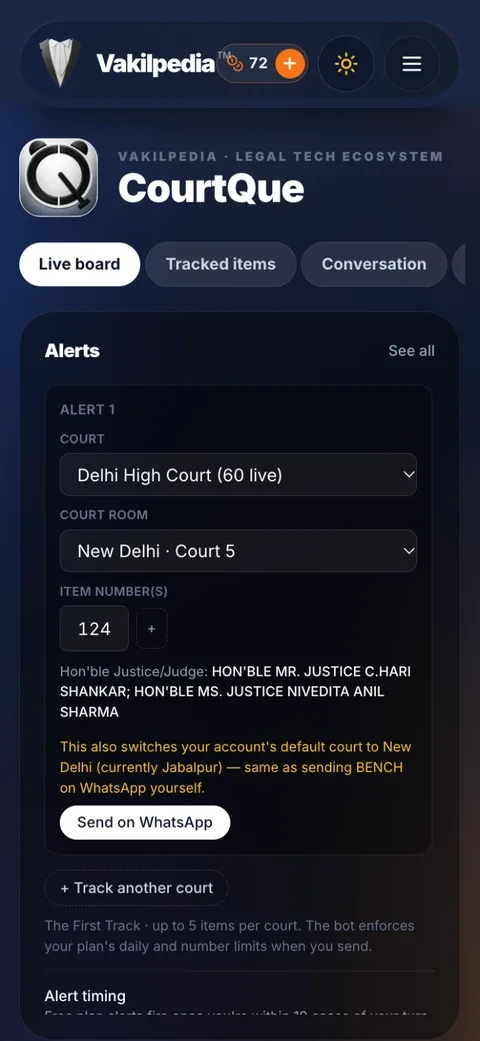
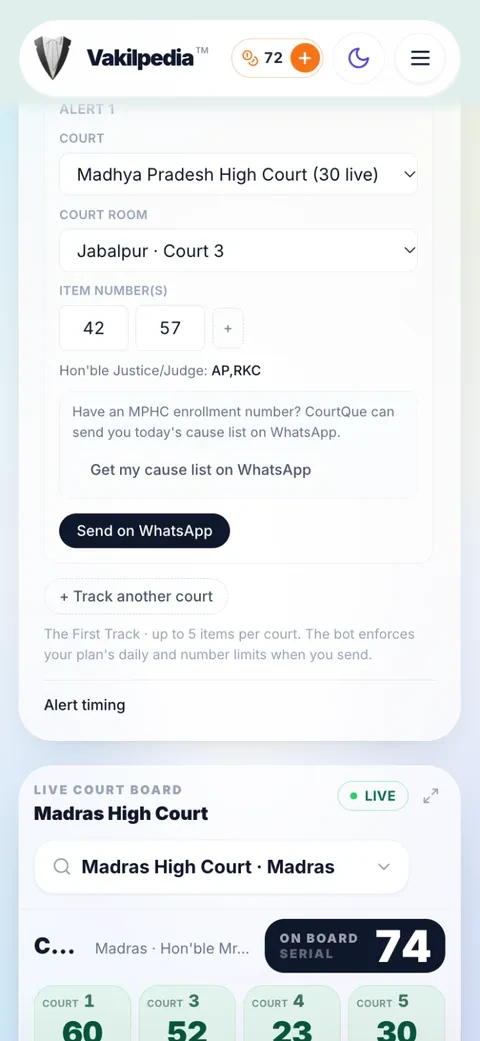
Setting an alert in dark mode
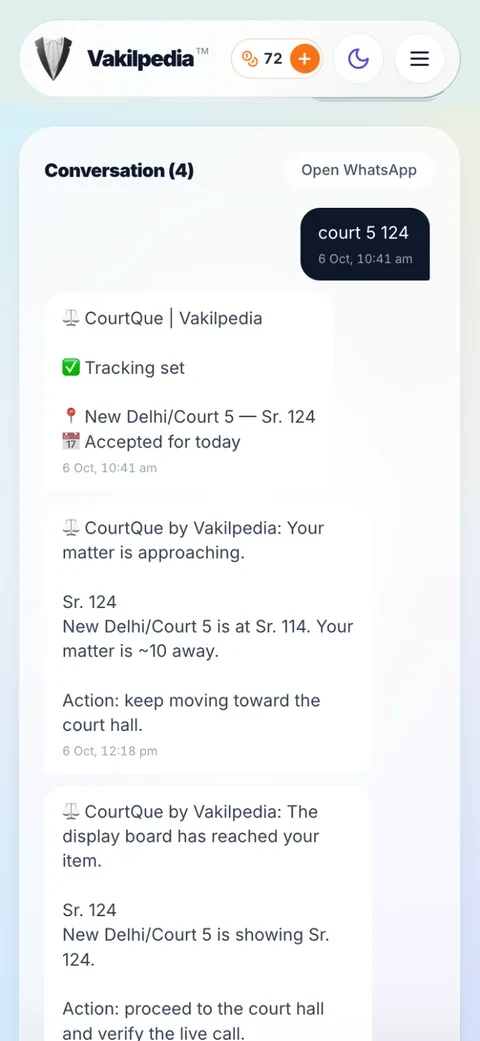
A CourtQue alert thread in light mode
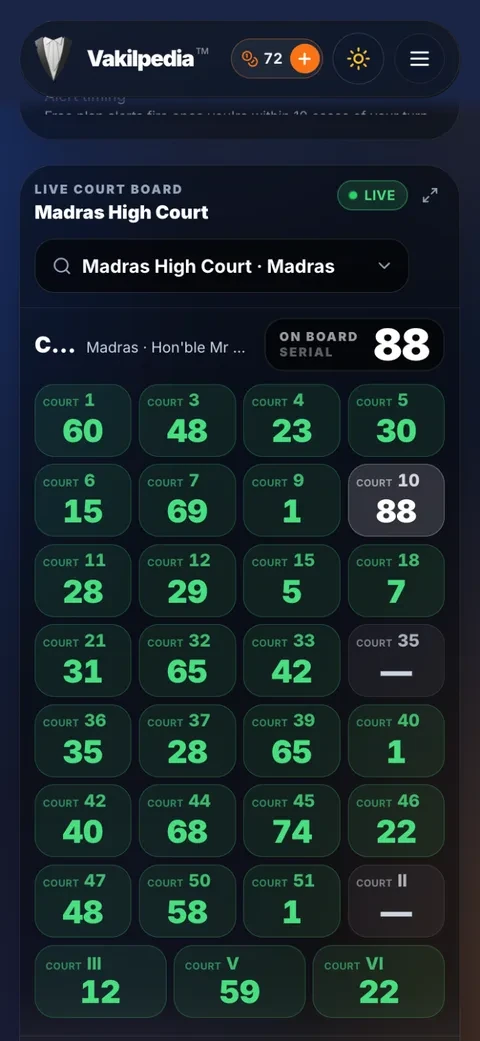
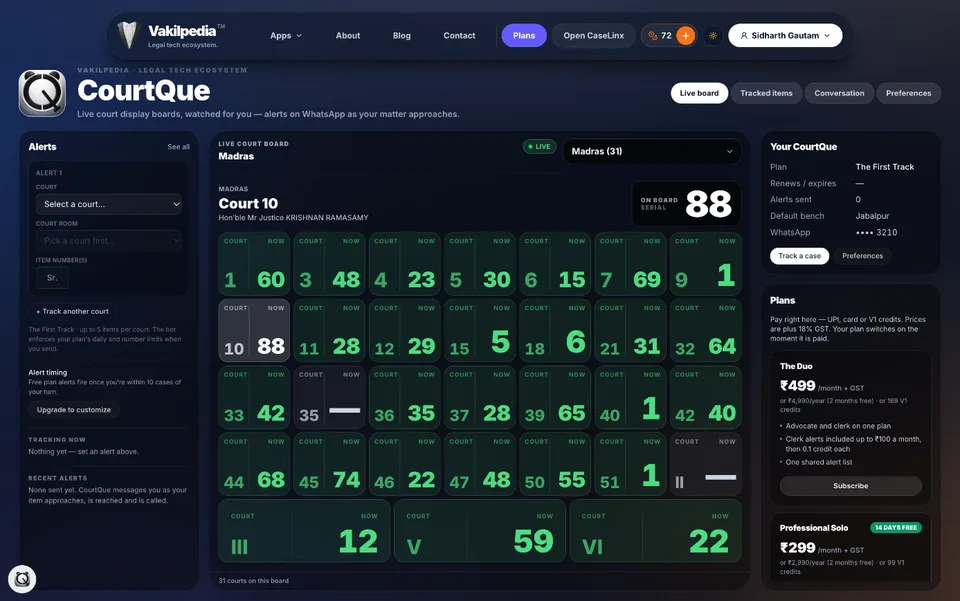
The Madras High Court board in dark mode
Why lawyers use it

Your item number, watched for you.

1 / 7Swipe
Your time back

Stop standing in the corridor waiting for your item.

Tell CourtQue your court and item number once. It watches that court’s display board through the day and messages you on WhatsApp as the board closes in. Draft in chambers, take the client call, have the chai — walk in when it matters.

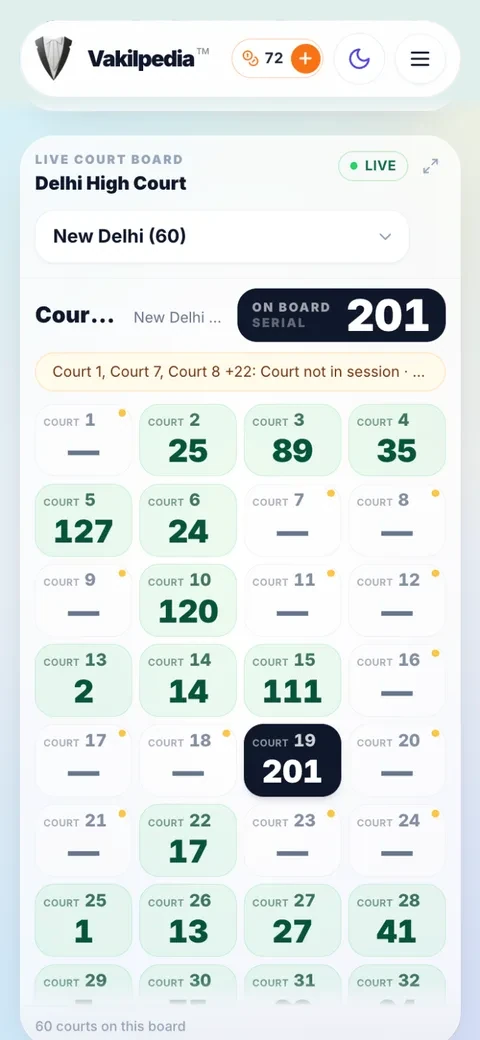
  • Every court on the bench, on one screen
  • Court notices shown with the board
  • The same app on your phone and your computer
CourtQue on a computer in dark mode: alerts, the live board and your plan side by side
The CourtQue live board on a phone: every court on the bench with the serial it is on
Pan-India

High Courts, tribunals and consumer commissions. Across India.

CourtQue covers High Court benches across the country, central tribunals and the consumer commissions — and the list keeps growing. If you appear in more than one forum, it is one app and one plan for all of them.

  • Search and switch benches in one tap
  • The coverage list on this page is always current
  • Send COURTS on WhatsApp for the same list
The Madras High Court board on CourtQue, in dark mode
On WhatsApp

The messages that matter. Nothing else.

One message when your matter comes within reach — 10 items ahead by default. If the board jumps past your item before that, the same single message tells you it may already have been called. A court notice reaches you once a day for that court, never once per matter. No app to install, no new inbox — the WhatsApp you already have open.

  • One alert per matter, not a string of reminders
  • One court notice a day, not one per matter
  • Every message also kept in the app
A CourtQue thread: tracking set, matter approaching, board reached
Set up in seconds

One line on WhatsApp. Or pick it in the app.

Type “court 5 124” to the bot and that is the whole setup. Or open CourtQue, pick the court and court room, add your item numbers — several in one go — and send it to WhatsApp with one tap. Track more than one court the same day.

  • Several items in one court, several courts in a day
  • The bench’s judges shown as you pick
  • Cancel any time — send STOP
Setting an alert in CourtQue, dark mode: court, court room and item number
Your cause list does the work

Save your enrolment number. Your day sets itself up.

In the MP High Court, CourtQue reads today’s cause list by your enrolment number and sets an alert for every matter on it. Turn on auto-track and it does that every morning, before you have left home.

  • MYLIST — today’s list, alerts for every matter
  • AUTOTRACK — the same, every court day
  • Available for the MP High Court first
CourtQue offering today’s cause list by MP High Court enrolment number
Your gap, your call

Alerts as early as you need them.

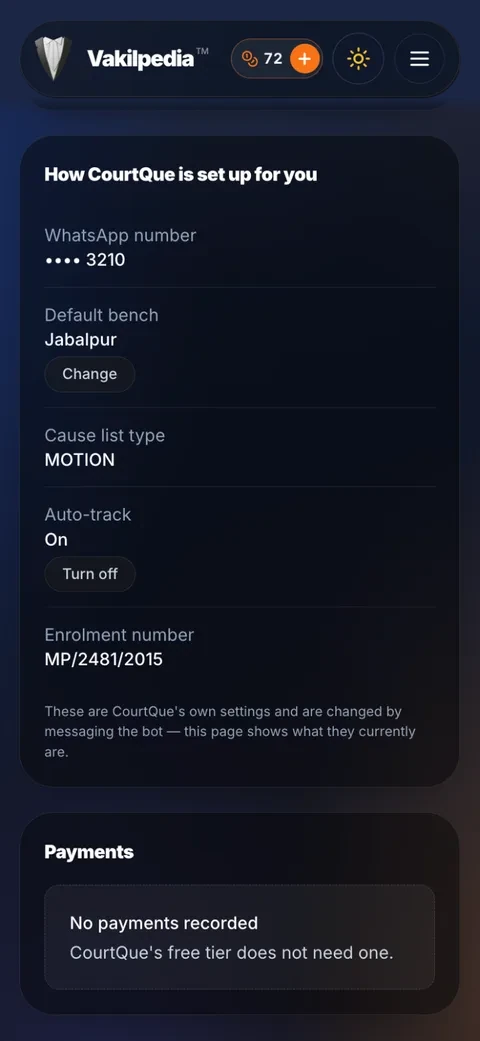
Two floors up and a crowded lift? Choose how many items ahead the first alert fires. Set the bench you usually appear before so the right board is watched without asking.

  • Free and Lite alerts fire 10 items ahead
  • Solo and Duo choose their own gap
  • Court holidays are respected
How CourtQue is set up for you: default bench, cause list type, auto-track, enrolment
Day or night

Light for the court hall. Dark for the late-night brief.

CourtQue follows your phone’s light or dark mode, or you can choose. Add it to your home screen and it opens full screen like an app — on iPhone and Android, no app store needed.

  • Light and dark mode
  • Add to Home Screen — opens like an app
  • App Store and Google Play: coming soon
CourtQue in dark mode
CourtQue in light mode
In WhatsApp

It runs where you already are.

No app, no dashboard, no new password. Send one line to set a matter up, and the alerts come back to the same chat.

court 5 124Track item 124 in Court 5. That is the whole setup.
COURTSEvery court CourtQue currently tracks.
STATUS 5The live board for a court, right now, in the chat.
MYLISTMP High Court: today's cause list by your enrolment number, with alerts for every matter.
AUTOTRACK ONMP High Court: do that every morning. AUTOTRACK OFF stops it.
ALERTS · STOPSee what is being tracked, or cancel everything.
Fair pricing

Fair pricing. For every advocate.

Try Professional Solo free for 14 days — no card needed. One court day, a month, or a year — pay by UPI or card, or with the V1 credits you already use across Vakilpedia.

₹0
The First Track
One free alert, 10 items ahead
₹20/day + GST
CourtQue Daily Pass
3 alerts that day
7 V1 credits
₹149/month + GST
Lite
250 WhatsApp messages a month (alerts and replies)
49 V1 credits
₹399/month + GST
Professional Solo
500 WhatsApp messages a month (alerts and replies)
₹3,990/year · 2 months free · 99 V1 credits
₹549/month + GST
The Duo
850 WhatsApp messages a month (alerts and replies), shared by advocate and clerk
₹5,490/year · 2 months free · 169 V1 credits

Paid inside CourtQue in one pop-up, or from WhatsApp. Monthly renews on UPI AutoPay until you stop it; yearly is one payment; the Day Pass covers a single court day. 18% GST on every cash price. Every paid plan includes a monthly allowance of alerts; past it each alert costs 0.1 V1 credit, and with no credits left alerts pause and we send you one message with a link to add credits. The Duo adds one clerk, sharing the same allowance.

Every app’s price on one page
Side by side

CourtQue and typical cause-list apps.

CourtQueTypical app
Follows the live display boardRare — usually the cause list only
Alert as your item approachesRare
Tells you if the board passes your itemRare
Alerts on WhatsApp or in your browserUsually app notifications
Nothing to installAn app download
Clerk on the same planThe DuoRare
Pay with credits you already holdV1 creditsCard or UPI only
Coverage

Courts CourtQue watches.

Always current. Tap any bench to open its board above.

Questions

Frequently asked.

How does CourtQue know when my case is coming up?

It follows the live court display board — the same board shown in the court hall — and tracks the serial number currently being heard. When the gap between that serial and your item closes, you are messaged. It is the board CourtQue watches, not a diary or a cause-list date.

Which courts does CourtQue cover?

Coverage spans High Court benches across India, central tribunals and the consumer commissions, and it keeps growing. The list on this page is always current, and you can also send COURTS to the WhatsApp bot for the same list.

When exactly do I get the alert?

You get one message, as the board comes within your gap of your item — 10 items ahead by default, and Solo and Duo can choose a different gap. If the board jumps past your item before that message goes out, the one message tells you it may already have been called. The same matter never gets repeat reminders.

Do I need to install anything?

No. Alerts arrive in WhatsApp. Your Vakilpedia account exists so that your plan, your history and your other Vakilpedia apps are in one place — but there is no app to download and nothing to keep open.

How do I pay for a paid plan?

Inside the CourtQue app, in one pop-up: UPI or card, or V1 credits from your Vakilpedia wallet. Monthly plans renew on UPI AutoPay until you stop them; yearly is one payment for 12 months; the Day Pass is a one-off for a single court day. 18% GST is added to every cash price. You can also pay from WhatsApp — the bot sends the same payment page.

Can my clerk get the same alerts?

Yes, on The Duo. The advocate and one clerk share one alert list and one monthly allowance of alerts. After that, each further alert costs 0.1 V1 credit from the payer’s wallet.

Is the board information guaranteed to be correct?

No, and CourtQue does not claim it is. Display boards are published by the courts themselves, change without notice and occasionally stop. CourtQue is a convenience tool: always rely on the official court display and your own verification before acting.

CourtQue shows information that the courts themselves make public on their display boards: the court room, the item being heard, the presiding judge and any notice the court posts. It does not alter that information, does not rank it, and stores nothing about your matters beyond what you send it. Boards are published at the court's discretion: they can change, pause or go offline without notice, and a court may sit differently from what its board shows.

Indian courts work on the principle of open justice: proceedings, and what courts publish about them, are public unless a court restricts publication or a law prohibits it. Under Section 52(1)(q)(iv) of the Copyright Act, 1957, reproducing or publishing a judgment or order of a court is not an infringement of copyright unless that court has prohibited it. Under Section 3(c)(ii) of the Digital Personal Data Protection Act, 2023, that Act does not apply to personal data made publicly available by a person who is under a legal obligation to make it public. The Supreme Court held in R. Rajagopal v. State of Tamil Nadu, (1994) 6 SCC 632, that publishing what is part of the public record, including court records, does not violate the right to privacy. If a court has restricted publication of anything CourtQue shows, or you want something removed, write to info@vakilpedia.com and we will act on it promptly.

CourtQue is a convenience tool only. It is not a substitute for the official court record, the cause list, or your own presence and verification — always rely on official court data and your counsel's advice before acting on an alert.

Your item is on a board somewhere. Let CourtQue watch it.

Sign up with your Vakilpedia account or say hi on WhatsApp. Try Professional Solo free for 14 days — no card needed.

CHC Jalpaiguri display board: what you are looking at

This is the live display board of the Calcutta High Court, Jalpaiguri Circuit Bench. People look for it as "CHC Jalpaiguri display board", "Calcutta HC Jalpaiguri display board", "Jalpaiguri High Court display board" or "Calcutta High Court Jalpaiguri Circuit Bench display board". Item numbers for each courtroom appear on the board above while the court is sitting.

The Calcutta High Court sits at Kolkata, Jalpaiguri, Port Blair. Each seat has its own board: Calcutta High Court display board, Calcutta High Court Port Blair Circuit Bench display board.

How do I check the CHC Jalpaiguri display board?
Use the board at the top of this page. It lists each courtroom of the Calcutta High Court, Jalpaiguri Circuit Bench with the item it is hearing now. Tap a courtroom for its details; double tap it to set an alert.
Which courtrooms are on the Calcutta High Court Jalpaiguri Circuit Bench board?
Every courtroom of the Calcutta High Court Jalpaiguri Circuit Bench appears here while the court is sitting.
Can I get a WhatsApp message when my item on the Calcutta High Court Jalpaiguri Circuit Bench board is near?
Yes. Set an alert on a courtroom and CourtQue messages you on WhatsApp as your matter approaches, again when the board reaches it, and if it moves past. Free to start, nothing to install.
Is there a separate board for Kolkata and Port Blair?
Why can this board differ from the one in the court hall?
Courts change their lists during the day and boards refresh at intervals, so a number can run a little behind. Always confirm on the court's own board or in the court hall before acting.