
Vakilpedia · Legal Tech Ecosystem

ArguLinx — argue from your notes: PDF case notes app for advocates on iPad and Android

Coming soon

Your arguments, indexed.

Open every PDF in a matter, mark what matters, and let your notes become the index you argue from. Built for the lectern, on iPad and Android tablets.

₹399 a month, plus 18% GST. Store charges are already included.

Every PDF in one indexHighlights become cardsCards connect across filesSearch every file at onceSpeak from your notesStraight from the High Court’s ERPBring your own cloud
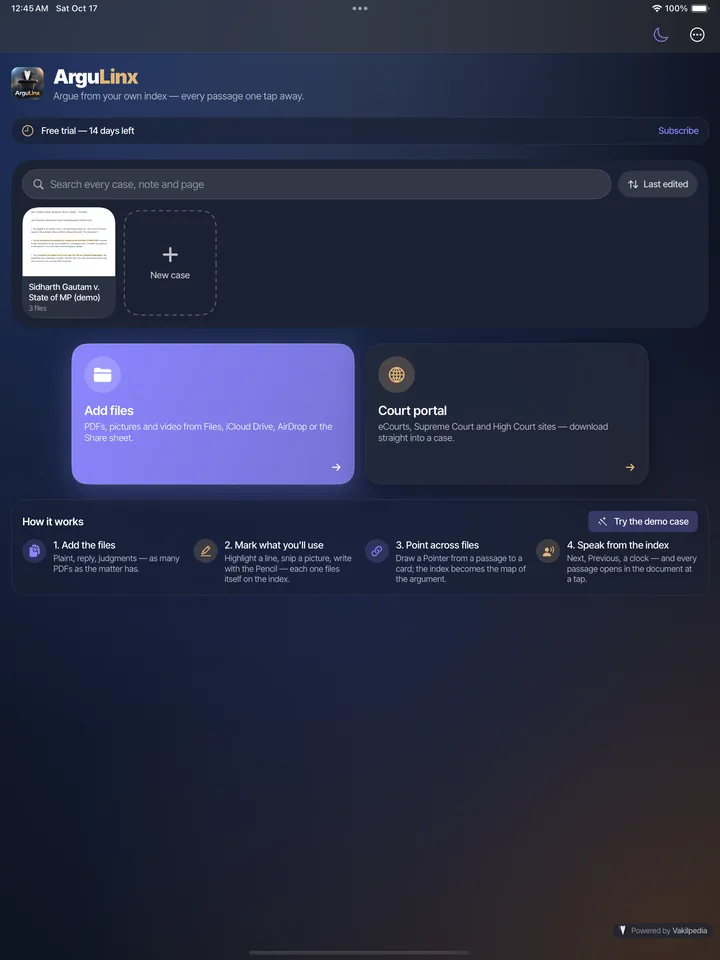
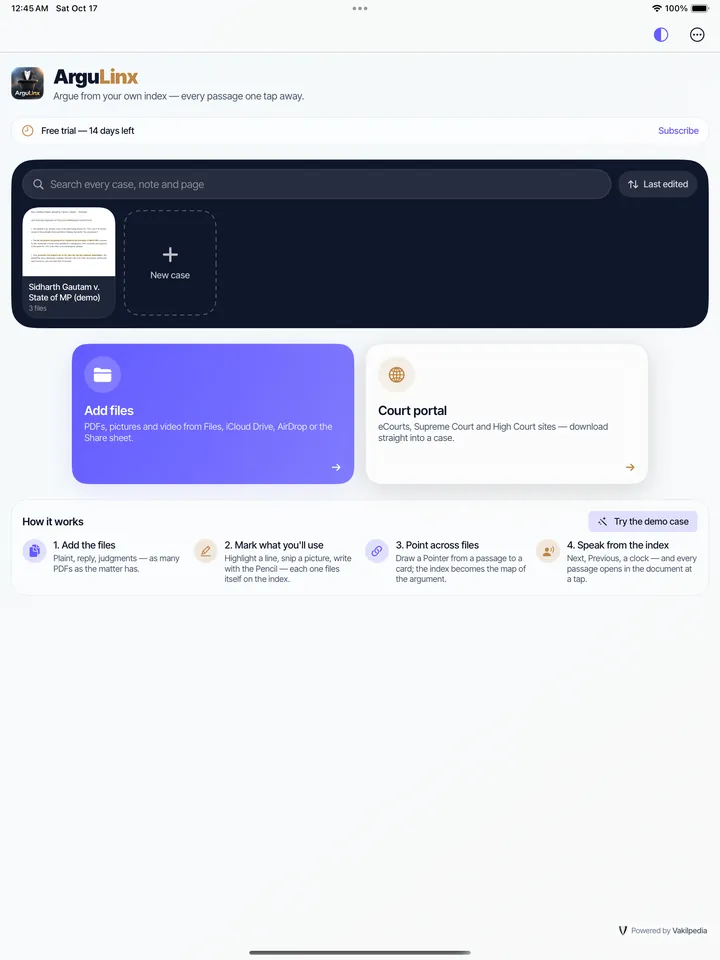
ArguLinx home on iPad in light mode: Add files, the Court portal and search
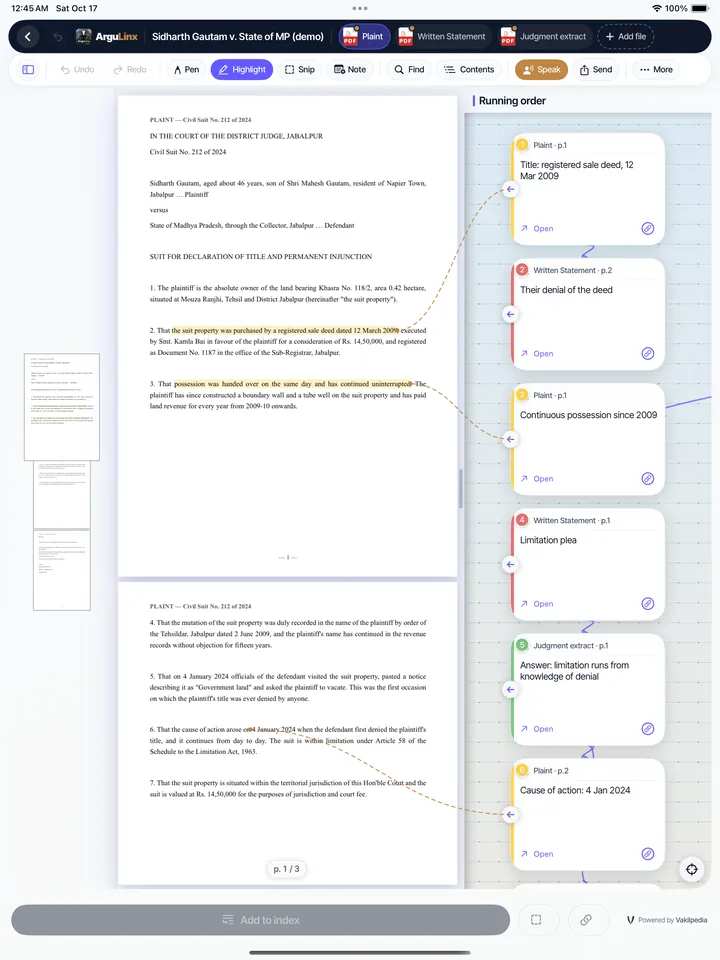
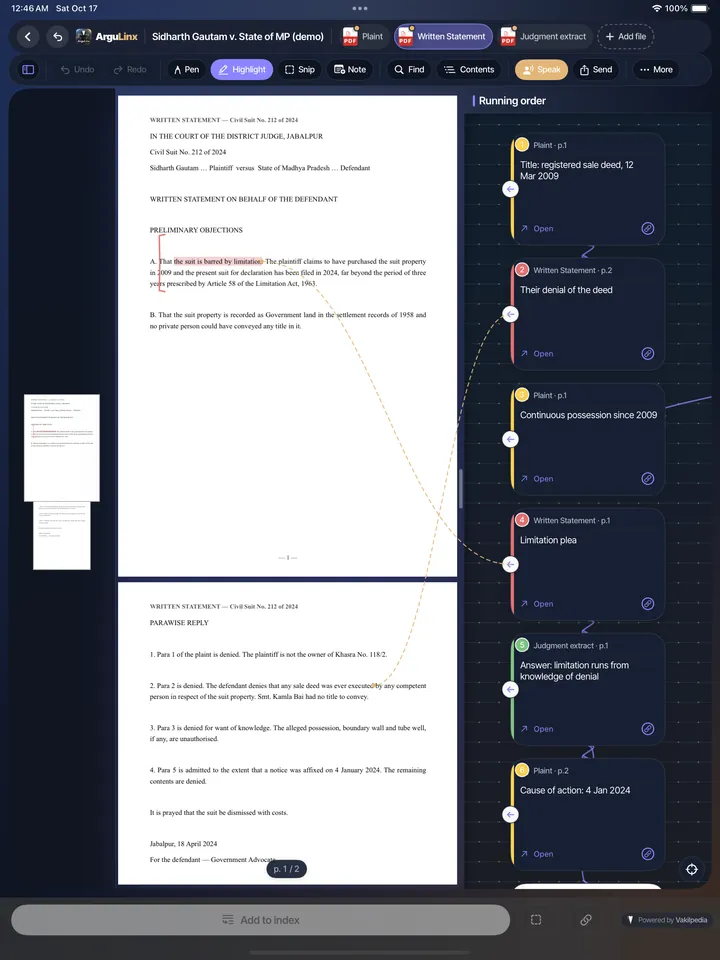
The ArguLinx reader on iPad in dark mode with a highlighted passage and the running-order index
Availability

Will be available on the App Store and Google Play, for iOS and Android.

Best used on tablets.

How to use it

From the first PDF to the lectern.

  1. Start here

    Add the files

    Bring in the plaint, the written statement and the key judgments — from your files, from your own cloud, or straight from the High Court’s ERP.

  2. Then mark it

    Mark what you’ll use

    Highlight a line, snip a picture or write with the Pencil. Every mark flows into your index as a card.

  3. Then connect it

    Point across files

    Connect one card to another, even when they sit in different PDFs, so the argument holds together on the page.

  4. Then speak

    Speak from the index

    Switch to Speak. Next and Previous walk you through your points, and each page is on screen when you reach it.

See it in the app

A stack of PDFs becomes one index you argue from.

ArguLinx home on iPad: a matter, Add files and the Court portal
Everything in one place

Every PDF in the matter, in one place.

Bring in the plaint, the written statement and the judgments exactly as they sit on your file — PDFs, pictures and video. Or sign in to the High Court’s ERP, eCourts or the Supreme Court site inside ArguLinx and download straight into the case. One search then runs across every case, note and page.

  • PDFs, pictures and video from your files and your own cloud
  • High Court ERP, eCourts and Supreme Court downloads land inside the case
  • One search across every case, note and page
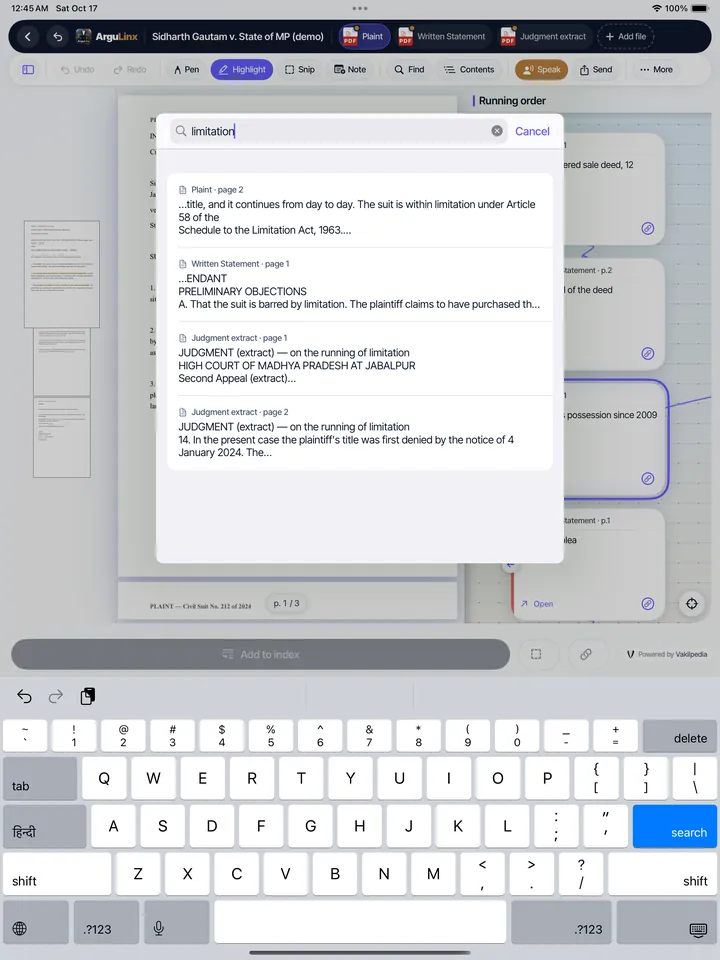
ArguLinx search on iPad: one word found across the plaint, the written statement and the judgment, each result showing its file and page
Indexed search

Search every file in the matter at once.

Type a word and ArguLinx looks through the text of every PDF in the case, your notes, your scanned pages and your handwriting. Each result shows its file and page, and when you open it the words are highlighted for you. Scans are read in the background as you bring them in, so they become searchable without an extra step.

  • One search across every file, note and page
  • Scanned pages are read in the background and become searchable
  • Each hit shows its file and page, and pulses when you land on it
The ArguLinx reader on iPad in dark mode: page thumbnails on the left, the running-order index on the right
Mark what matters

Highlight a line. It becomes a card in your index.

Read with page thumbnails beside you. Highlight a passage, snip a picture or write a note with the Pencil, and each one drops into the running-order index — labelled with the file and the page it came from.

  • Highlight, pen and snip on any page
  • Every mark is a card that remembers its file and page
  • Thumbnails and contents to move quickly
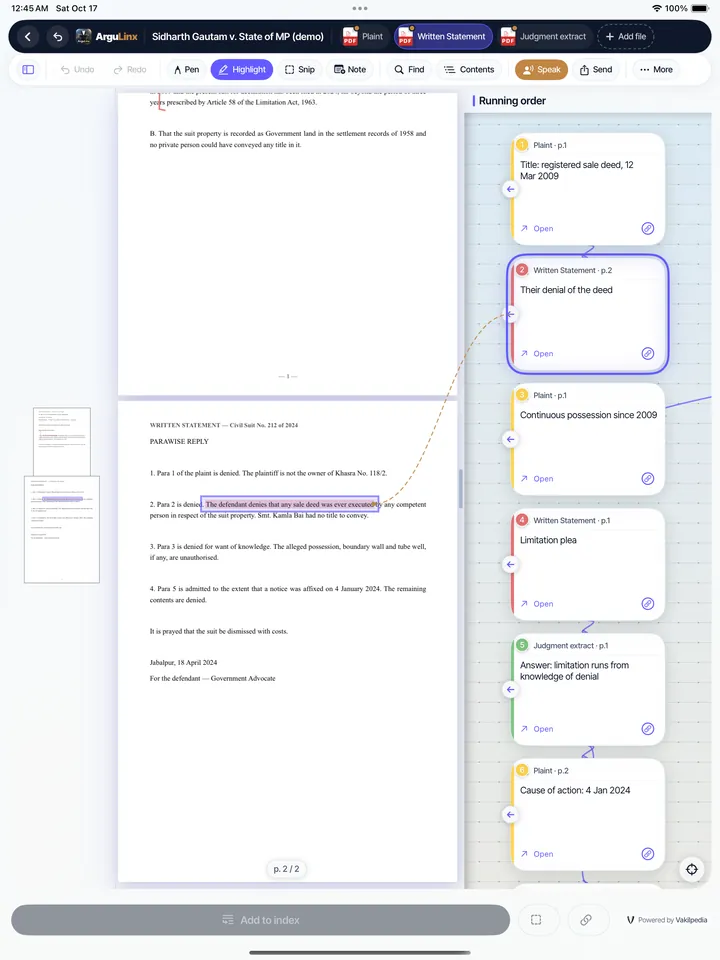
ArguLinx on iPad: a card opens the matching page in another file
Connect across files

Draw the line from the plaint to the denial.

Join one card to another and the argument takes shape across your files. Tap Open on any card and the exact page appears — even when it lives in a different PDF.

  • Connect cards across different files
  • Open jumps straight to the page
  • Colour-coded by the file each card came from
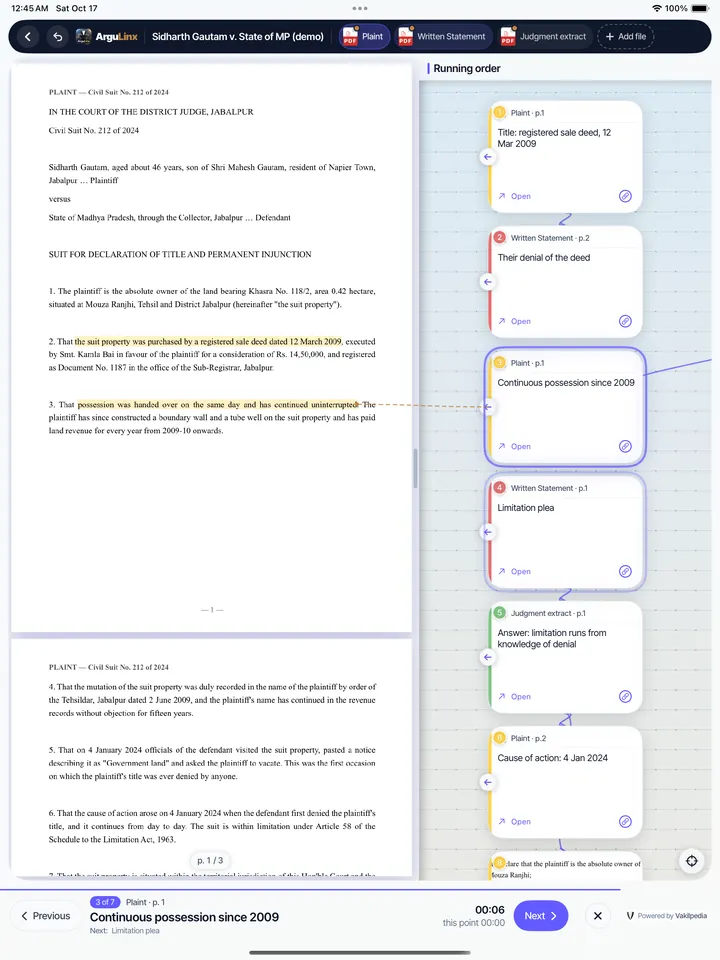
Speak mode on iPad: the page beside the running-order index, with Previous and Next
Argue from your notes

At the lectern, just tap Next.

Switch to Speak and the index becomes your running order. Next and Previous move you from point to point and put the right page on screen, with a timer at the bottom so you keep to your time.

  • Next and Previous through your points
  • The right page opens with each point
  • A timer beside you while you argue
Fits the way you already work

Your court portal. Your own cloud.

Straight from the High Court’s ERP

Open the High Court’s ERP inside ArguLinx, sign in yourself, and download straight into the case. eCourts and the Supreme Court sites are there too. ArguLinx asks which case each download belongs to, and it never stores your court login.

Bring your own cloud

Back a case up to the Google Drive, iCloud Drive or other cloud you already use, and restore it on another device. The backup is your own file in your own cloud, and ArguLinx never syncs anything on its own.

  • Scan paper with the camera and make it searchable
  • Export your index as a PDF and share it
  • Works without a connection once a file is in the case
Light or dark

Light for the chamber, dark for the long evening.

Switch ArguLinx between light and dark whenever you like. The app around your documents changes with it, while your PDF pages stay exactly as filed.

ArguLinx home on iPad in light mode
Light mode
ArguLinx home on iPad in dark mode
Dark mode
The ArguLinx reader on iPad in light mode
Light mode
The ArguLinx reader on iPad in dark mode
Dark mode
What it costs

One price. Nothing hidden.

₹399a month, plus 18% GST

The App Store’s and Google Play’s charges are already inside the price, so it is the same on iPad and Android tablets. Your Vakilpedia account is the one sign-in for ArguLinx and every other Vakilpedia app.

Get early access

ArguLinx — questions advocates ask

Gather the plaint, written statement and judgments in one place, highlight the lines you will rely on, and arrange those marks in the order you will argue. ArguLinx turns every highlight and note into a card in one running-order index, so you speak from your own notes instead of paging through stacks of PDFs.

ArguLinx is a native app for iPad and Android tablets. You highlight, write with the Pencil or snip a picture on any PDF in a matter, and every mark keeps its file and page so you can jump straight back to it.

Yes. In ArguLinx you connect one card to another, even when they come from different files, and tapping Open takes you to the exact page.

Yes. ArguLinx searches the text of every PDF in a case, your notes, scanned pages and handwriting in one go. Each result shows its file and page, and the matching words are highlighted when you open it. Scanned pages are read in the background as you bring them in.

Yes. ArguLinx opens the High Court’s ERP, eCourts and the Supreme Court sites in a browser inside the app. You sign in yourself and download, and ArguLinx asks which case the file belongs to. It never stores your court login.

Yes. You can add files from, and back a case up to, the cloud you already use, such as Google Drive or iCloud Drive. The backup is your own file in your own cloud, and ArguLinx does not sync anything on its own.

ArguLinx is distributed through the App Store and Google Play. This page shows the download links once the app is available; until then you can sign up with your Vakilpedia account for early access.