VakilCard — free digital visiting card for advocates
हमेशा के लिए फ्री
आपका डिजिटल चैंबर
आपकी प्रैक्टिस की वेबसाइट, चैंबर और कार्ड।एक वेरिफ़ाइड लिंक पर।
Building your name is how a practice grows. VakilCard gives you one address — vakilpedia.com/yourname — that carries your chamber, your phone, your practice areas and your enrolment number, takes your consultation fee, gives directions and books meetings online or at your chamber. A verified blue tick shows clients it is really you. Change anything and every card you have ever shared updates. No more paying thousands for a website that goes stale.
वकीलों के लिए बना। 3 मिनट से कम में लाइव। WhatsApp पर सुरक्षित वेरिफ़ाई।
Your own /usernameवेरिफ़ाइड एडवोकेट ब्लू टिकआपकी वेबसाइट की जगहPayments built inऑनलाइन या चैंबर में मीटिंग बुकिंगNFC cards coming soon
क्लाइंट क्या देखता है
One tap, and they have everything.
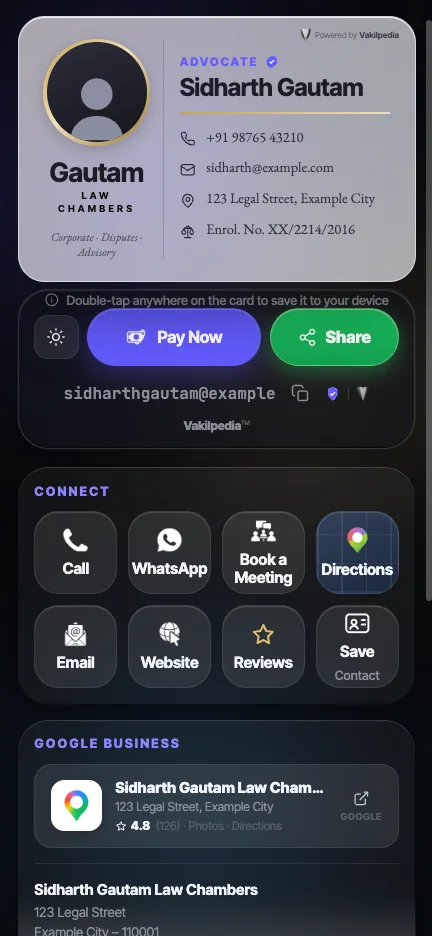
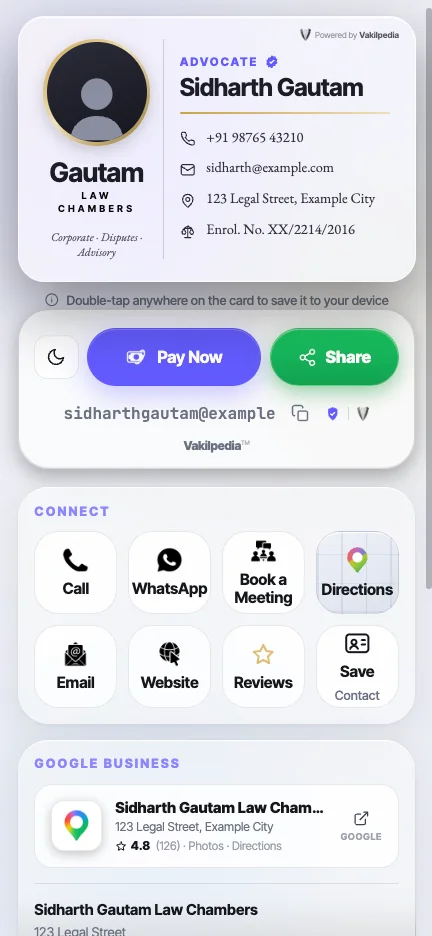
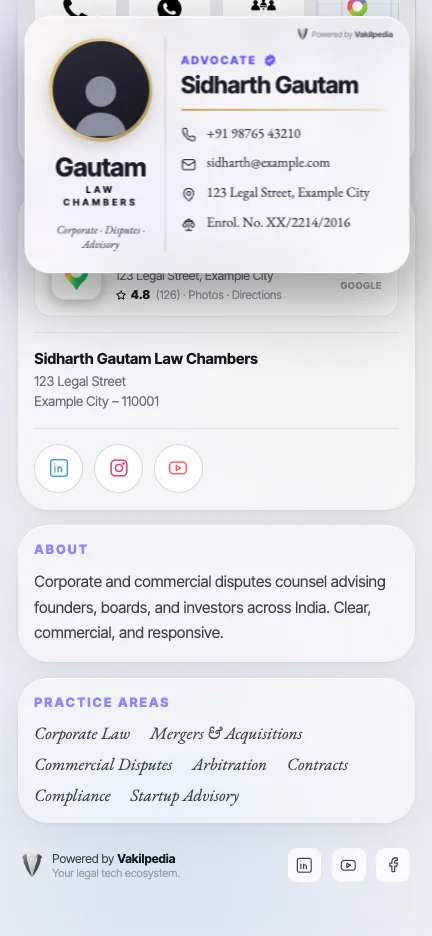
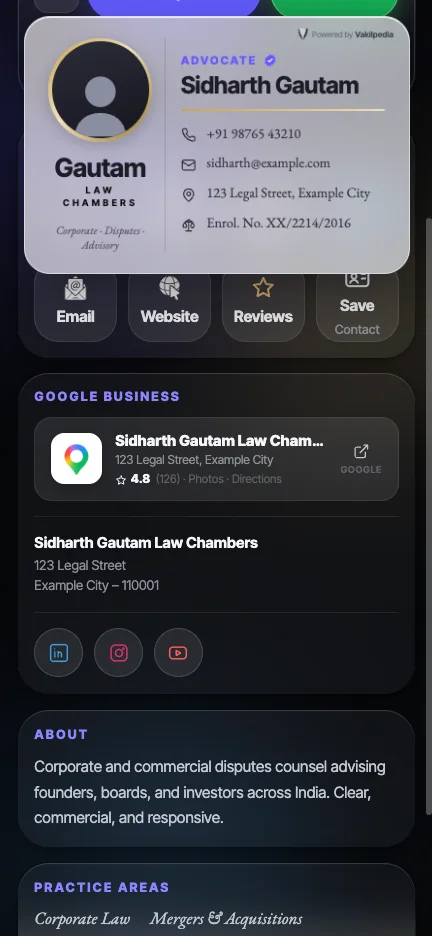
This is the real card, not a picture of one — the same page a client opens when they tap your link, filled with sample details. Try the buttons.
सैंपल डिटेल्स वाला एक असली VakilCard
वकील इसे क्यों इस्तेमाल करते हैं
Not a visiting card. The front door to your practice.
1 / 6Swipe
Your name is your brand
Your /username. The one address clients remember.
Clients forget phone numbers and lose paper cards. They remember a name. vakilpedia.com/yourname goes on your letterhead, your WhatsApp profile, your chamber board, your email signature — and it never changes, even when your chamber, your number or your firm does. Claim it before someone with your name does.
A free link from day one — or your own name with Pro
Checked live as you type, held for you while you pay
One permanent link — change everything behind it any time
One card, everything built in
Pay, find you, book you — from one card.
Stop sending your number, then your location, then your UPI ID, then “when are you free?”. Share one card. Your client pays your consultation fee, gets directions to your chamber, saves your contact and books a meeting — all from the same link. And when you want to set up a call yourself, tap Send booking link on your own card: the client picks a time that suits you both and a Google Meet is ready.
Pay Now — your UPI, money straight to you
Directions to your chamber in one tap
Book a Meeting — on WhatsApp, or straight into your calendar with Pro
Send a client a private booking link on WhatsApp or email — a Google Meet is made for you, free
Send a booking link — free
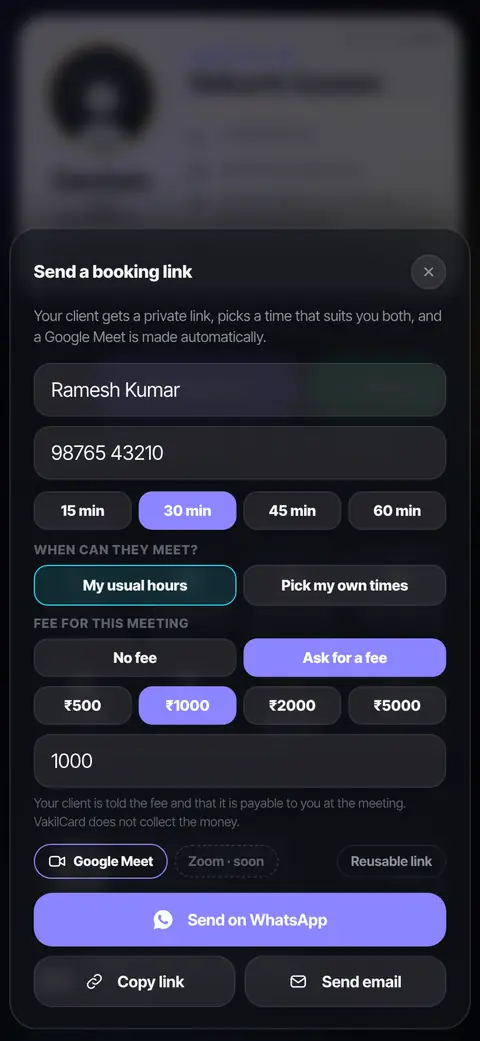
Send a private booking link. The Google Meet makes itself.
Tap Send Link on your own card, type your client’s name and their WhatsApp number or email, and send. Your client opens a private page, picks a time that suits you both, and a Google Meet is created in your Google Calendar. No back-and-forth, no account for your client. The link is theirs alone and lapses after 7 days.
Send on WhatsApp, or by email with the message already written
Your usual hours — or your own times for this one client
Free on every card — up to 2 bookings a month
Pro: no monthly limit, and you can ask for a fee that your client pays straight to your UPI
VakilCard never collects or holds your fee. Your client pays you by UPI and you confirm it in your own UPI or bank app.
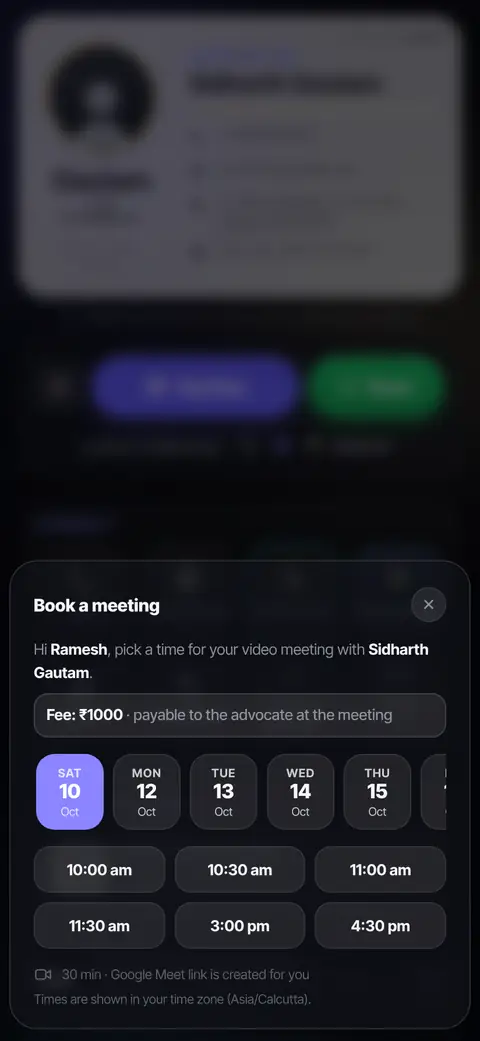
What your client sees
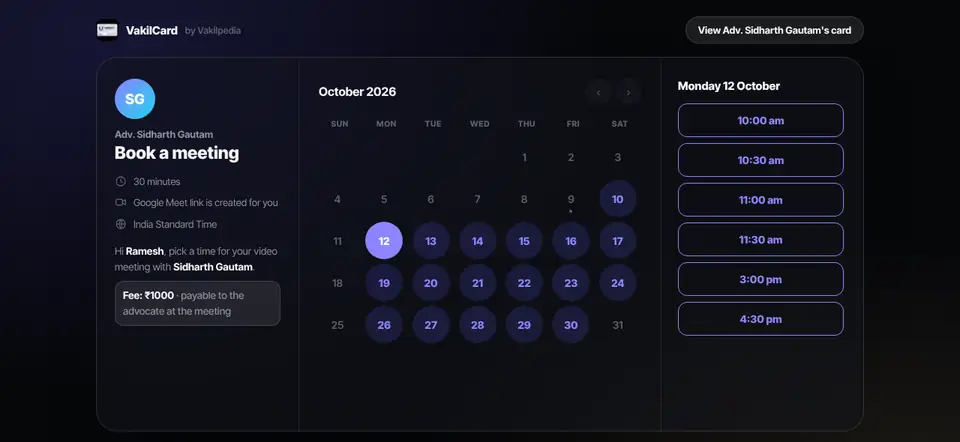
A proper booking page, on a computer or a phone.
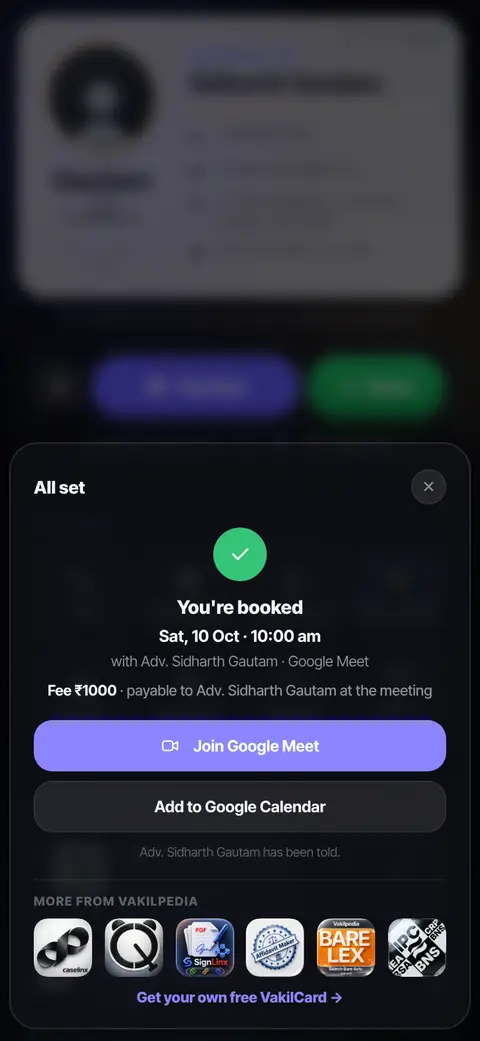
On a computer your client gets a clean calendar page; on a phone, a sheet that opens right over your card. They see only the times you offered, pick one, and they are booked — with a Join Google Meet button, an Add to Google Calendar button.
Nothing for your client to sign up for
Times shown in your client’s own time zone
Pro: clients can reschedule or cancel, get a reminder email, and you can keep one reusable link for everyone
Your digital chambers
आपकी प्रैक्टिस की वेबसाइट — वेबसाइट के ख़र्च के बिना।
Advocates often pay ₹15,000 to ₹50,000 for a website that nobody updates. Your VakilCard is the page a client lands on when they look you up: your chamber, your practice areas, a few lines about you, your social links, payments and bookings. Update it from your phone in a minute — every card you have ever shared updates with it. No developer, no hosting bill, no site that goes stale.
Practice areas, about, chamber address and socials
Double-tap the card to save it as a picture
Light and dark, the way your client’s phone is set
Trust, before the first call
वेरिफ़ाइड ब्लू टिक। क्लाइंट जानते हैं कि यह सच में आप हैं।
Anyone can make a profile online and call themselves an advocate. With Pro, our verification team checks your advocate ID by hand and switches on a blue tick next to your name — so a client trusts you before the first call. Connect your Google Business listing and your rating sits on your card too.
Verified advocate blue tick — advocate ID checked by hand (Pro)
Your enrolment number and WhatsApp-verified number
Your Google listing and rating; one-tap reviews with Pro
वेरिफ़ाइड एडवोकेट
एक ब्लू टिक, जिस पर आपके क्लाइंट भरोसा कर सकें।
Online, anyone can call themselves an advocate — and clients have no easy way to tell. The VakilCard blue tick tells a client, before the first call, that a real person at Vakilpedia has checked your advocate ID. It is the one thing a website or a paper card cannot give you.
1
आप अपना एडवोकेट ID अपलोड करते हैं
From your VakilCard dashboard: a photo of your Bar Council identity card or enrolment certificate, with your name and enrolment number as they appear on it.
2
एक व्यक्ति उसे ख़ुद जाँचता है
A member of our verification team compares the ID with the details you gave and with your card — name, enrolment number and Bar Council. Nothing is approved automatically.
3
उसके बाद ही टिक लगता है
If anything does not match or the photo is unclear, we do not approve and tell you why. Once approved, the blue tick shows next to your name for as long as you are on Pro.
हम आपका ID कैसे सुरक्षित रखते हैं
प्राइवेट, एन्क्रिप्टेड स्टोरेज में रखा जाता है — कभी किसी पब्लिक लिंक पर नहीं।
Never shown on your card or to your clients. Only our verification team can open it, through links that expire in 10 minutes.
Only a small copy is kept: the photo is shrunk on your phone before it is uploaded.
Not approved? The photo is deleted. Want it removed later? Write to us and we delete it — the tick goes with it.
The blue tick confirms your identity and enrolment as shown on your ID on the day we checked it. It is not a rating or an endorsement of your work. Part of VakilCard Pro.
Free vs Pro
Free does a lot. Pro does the rest.
Everything you need to be found, paid and booked is free. Pro adds your own name, one-tap payment, calendar bookings and the extras that make a client feel looked after — 13 upgrades in all.
Free
9 of 19
Pro
19 of 19
Pro
Your own name as the link
vakilpedia.com/yourname on your letterhead, WhatsApp profile and chamber board — one address that never changes.
vakilpedia.com/98100…vakilpedia.com/yourname
Free: a link made from your number.
Pro
Paid in one tap
Pay Now opens your client’s UPI app with your consultation fee already filled in. The money goes straight to you.
Pay Now₹1,000
Free: your UPI QR and ID on the card.
Pro
Booked into your calendar
Clients book straight into your Google or CaseLinx calendar. With a link you send, they can reschedule or cancel, get a reminder, and you can keep one reusable link.
Mon 12Tue 13Wed 14
Free: Book a Meeting opens WhatsApp to you.
See all 13 differences, row by row
Free
₹0 forever
Best value
Pro
₹499 /year with AutoPay + GST
Price locked while AutoPay stays on · or ₹999 one-time Annual Pass
You can start free and upgrade whenever you like — every Pro button is visible on a Free card, so you can tap one and see what it does before you pay. Fees your clients pay go to your own UPI; VakilCard does not hold the money.
जल्द आ रहा है
VakilCard NFC. Tap it on a phone, your card opens.
A physical card for the court corridor and the first meeting. Your client taps it on their phone and your VakilCard opens — no app, no typing. It points at your /username, so it never needs reprinting. Claim your card now and it is ready when NFC cards launch.
Fair pricing
Fair pricing. For every advocate.
Your card is free forever, with a free link, payments to your own UPI, bookings on WhatsApp and private booking links with a Google Meet and your own times — up to 2 bookings a month. Pro is one payment a year for your own name as the link, one-tap Pay Now, paid bookings with payment checks, clients booking straight into your calendar with reminders, Google reviews, visitor stats, premium themes and no badge.
₹0 forever
Free
Your card and a free link · QR or NFC share
Your UPI QR · bookings on WhatsApp
Booking links with Google Meet — up to 2 bookings a month
₹499 /year with AutoPay (price locked)+ GST
Pro
Verified advocate blue tick — ID checked by hand
Your own name as the link · one-tap Pay Now · Google reviews
Paid bookings with payment checks · calendar booking with reminders
Visitor stats · premium themes · no badge
or ₹999 one-time Annual Pass — pay once, no AutoPay
Want VakilCard bookings in your CaseLinx calendar, next to your hearings? That is a ₹100/month add-on, bought in CaseLinx. Every Pro button is visible on Free — tap one to see what it does before you pay.
प्राइवेसी पहले। आपका मोबाइल नंबर तब तक प्राइवेट रहता है जब तक आप खुद उसे दिखाना न चुनें।
वकीलों के विज़िटिंग कार्ड — आम सवाल
बार काउंसिल ऑफ़ इंडिया के Rule 36 के 2008 के प्रोविज़ो के तहत: नाम, पता, फ़ोन और ईमेल, एनरोलमेंट की जानकारी, बार एसोसिएशन की सदस्यता, योग्यताएँ और प्रैक्टिस के क्षेत्र। सफलता के दावे, प्रशंसा-पत्र या कोई लालच नहीं।
जो आपसे पूछे उसे अपनी अनुमत जानकारी देना सूचना है, विज्ञापन नहीं। VakilCard वह जानकारी एक ही लिंक पर रखता है जो हर जगह अपने-आप अपडेट होता है।
जी हाँ। VakilCard आपके चेंबर की जानकारी के साथ आपका UPI QR भी दिखा सकता है।